Robots.txt vs LLMS.txt vs Cats.txt, Key Differences, Purposes for AI SEO
Discover the key differences between robots.txt, llms.txt, and cats.txt, their purposes, and how each file impacts AI search visibility, web crawling, and SEO.

- Published
- Reading time
- 9 min
On this page 7 sections
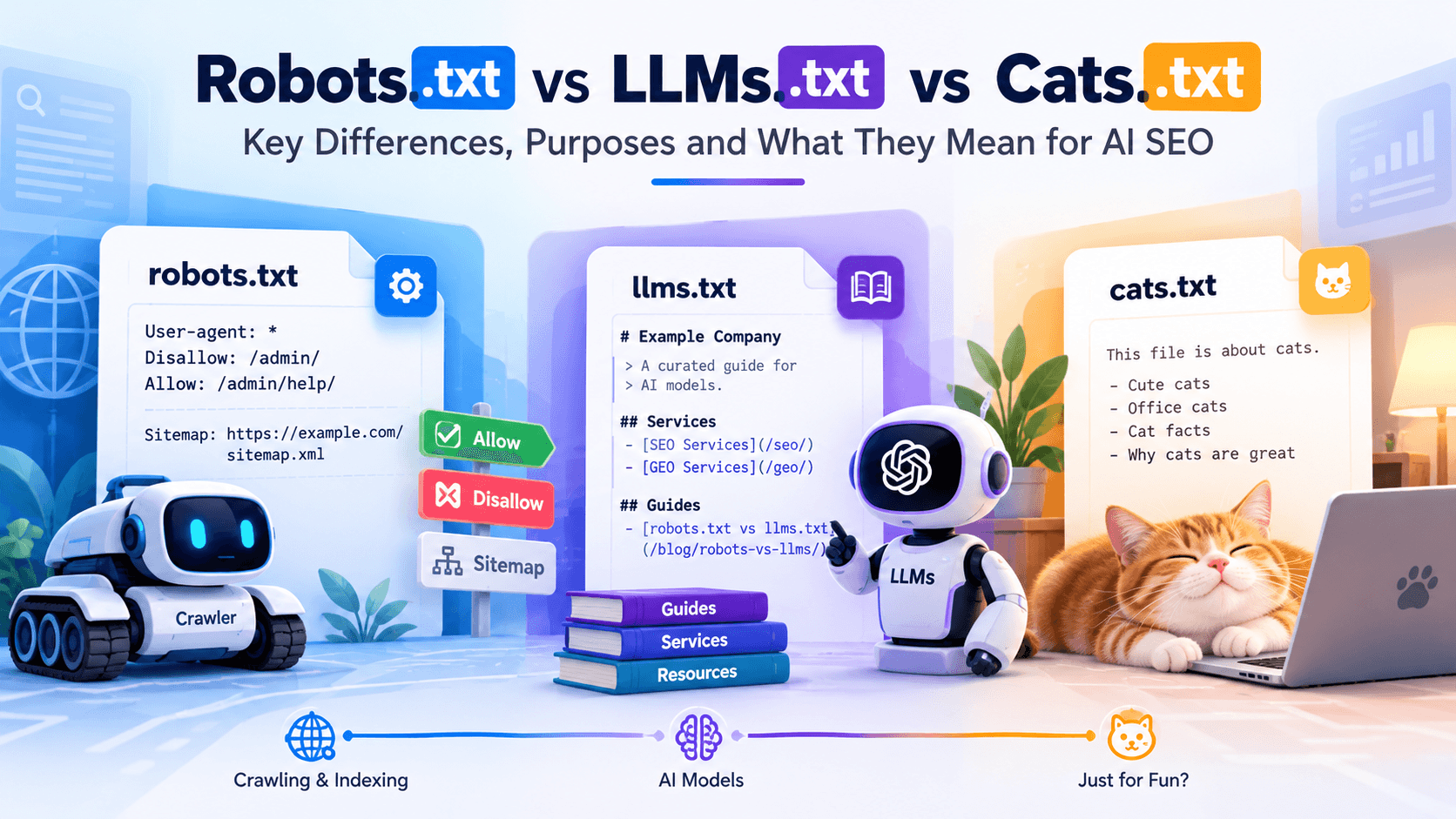
In an era where AI-powered search and content generation are rapidly evolving, site owners must understand how different “.txt” files influence crawling, indexing, and content consumption by large language models (LLMs). In particular, robots.txt, llms.txt, and the hypothetical cats.txt each have distinct purposes. In this blog, we’ll compare these three, explain when and how to use them, and show how they can jointly support your AI SEO strategy.
What Is robots.txt?
robots.txt is a plain text file at the root of your website (for example, example.com/robots.txt) that tells automated crawlers which URLs they may or may not request. It follows the Robots Exclusion Protocol, used since 1994 and formalized as an internet standard (RFC 9309) in 2022.
Basic syntax:
User-agent: *
Disallow: /admin/
Allow: /admin/help/
Sitemap: https://example.com/sitemap.xml
- User-agent: which crawler the rules apply to (* means all)
- Disallow / Allow: paths the crawler should not or may request
- Sitemap: where to find your XML sitemap
robots.txt and AI crawlers
Most major AI companies publish crawler names and say they respect robots.txt. Many separate bots that collect training data from bots that fetch pages to answer users in real time, so you can make different choices for each.
Company | Crawler (user-agent) | Main purpose |
OpenAI | GPTBot | Collecting content for model training |
OpenAI | OAI-SearchBot | Indexing for ChatGPT search results |
OpenAI | ChatGPT-User | Fetching pages when a user asks ChatGPT to |
Anthropic | ClaudeBot | Collecting content for model training |
Anthropic | Claude-SearchBot / Claude-User | Search indexing and user-requested fetches |
Perplexity | PerplexityBot | Indexing for Perplexity answers |
Googlebot | Google Search, including AI Overviews and AI Mode | |
Google-Extended (control token) | Whether content may be used for Gemini model training and grounding; it does not affect Google Search | |
Microsoft | Bingbot | Bing search and Microsoft Copilot answers |
Common Crawl | CCBot | Open web dataset used by many AI projects |
(Crawler names and purposes change. Check each company's current documentation before editing your file.)
What robots.txt can and can't do
- It can stop compliant crawlers from requesting pages, manage crawl load and let you allow search bots while blocking training bots.
- It can't enforce anything. Badly behaved bots can ignore it.
- It can't reliably keep a page out of search results. A blocked URL can still be indexed (without its content) if other pages link to it. Use a noindex meta tag (and let crawlers see it) or password protection instead.
- Blocking Googlebot to avoid AI Overviews also removes you from Google Search. There is no separate Googlebot just for AI Overviews.
Newer AI preference signals in robots.txt
Two efforts let sites express how content may be used by AI, beyond simple allow and block rules: Cloudflare's Content-Signal directive (for example, search=yes, ai-input=yes, ai-train=no) and the IETF AI Preferences (AIPREF) Content-Usage proposal. Both are still emerging and not universally honored, so treat them as statements of preference, not guaranteed controls.
What Is llms.txt?
llms.txt is a proposed file format, introduced in 2024 by Jeremy Howard of Answer.AI, that gives large language models a short, curated guide to a website's most useful content. It sits at the root of a site (example.com/llms.txt) and is written in Markdown, so it is easy for both people and AI tools to read.
Unlike robots.txt, llms.txt does not allow or block anything. It is closer to a curated reading list or table of contents for AI.
Example llms.txt:
# Example Company
> Example Company provides SEO and AI search services for businesses in India and worldwide.
## Services
- [SEO Services](https://example.com/seo/): Technical, on-page and content SEO
- [GEO Services](https://example.com/geo/): Visibility in AI answers
## Guides
- [robots.txt vs llms.txt](https://example.com/blog/robots-vs-llms/): How the two files differ
## Optional
- [About Us](https://example.com/about/)
The proposed structure is an H1 with the site or project name, a short blockquote summary, then sections of links with brief descriptions. Some sites also publish an llms-full.txt containing full page text in Markdown.
Does llms.txt help AI SEO?
The honest answer in 2026: there is little public evidence that it does, for search-style AI visibility.
- Google has said publicly that it does not use llms.txt for Search, and AI Overviews rely on Google's normal crawling and index.
- Major AI assistants have not confirmed that they use llms.txt to choose which sites to cite or recommend.
- Where llms.txt is clearly useful is in developer documentation: coding assistants and AI tools can load a clean, Markdown version of docs, and many software companies publish one for that reason.
When llms.txt is worth adding
- You have technical documentation, an API or a knowledge base that developers or AI agents use.
- You want a clear, low-maintenance summary of your key pages, which is also a useful internal exercise.
- It costs very little to create and keep updated.
Just don't expect it to replace robots.txt, structured data, good content or genuine authority, and don't promise clients that it will improve rankings or AI citations.
What Is cats.txt?
cats.txt is a deliberately satirical "web standard" created by technical SEO Mark Williams-Cook and reported by Search Engine Journal in August 2026. The file formally declares a site's office cats: their names, job titles, breeds and an affection score. It was published with a serious-looking specification, on purpose, to test the evidence people use to claim that llms.txt works.
What happened:
- AI and search crawlers, including GPTBot, ClaudeBot, PerplexityBot and Googlebot, requested the cats.txt file, as they request almost any file on a website.
- Google indexed it.
- ChatGPT, when asked, explained at length how cats.txt could help a site rank.
- Some SEOs started adding cats.txt to their own sites.
Those are the same kinds of "proof" often shared for llms.txt. Because cats.txt is made up and cannot possibly improve anything, the experiment shows that these observations don't prove a file has any effect.
The lesson for AI SEO
Common "evidence" | Why it doesn't prove much |
"AI bots fetched my file" | Crawlers request all kinds of URLs. A fetch is not support. |
"Google indexed it" | Any public text file can be indexed like a normal page. |
"ChatGPT said it helps" | Chatbots can produce confident explanations for things that don't work. |
"ChatGPT repeated something only in my file" | The file may simply be acting as another web page, not as a special standard. |
Better evidence to look for: official documentation from the AI or search company saying it uses the file, and measurable changes in citations, rankings or traffic compared with a control.
Should you add cats.txt? No. It has no function. If you liked the idea, the real takeaway is to test claims about new AI SEO files before adopting them.
(Note: earlier versions of this article described cats.txt as a hypothetical file for content categories. That use was our own illustration, not a real standard.)
4. robots.txt vs llms.txt vs cats.txt: Key Differences
robots.txt | llms.txt | cats.txt | |
What it is | Crawler access rules | Curated Markdown guide for LLMs | Satirical file about office cats |
Created | 1994; formal standard (RFC 9309) in 2022 | Proposed in 2024 | 2026, as a deliberate joke and experiment |
Who it's for | Search engines and AI crawlers | AI tools and agents | People testing SEO claims |
Can it block access? | Yes, for crawlers that comply | No | No |
Format | Directives (User-agent, Allow, Disallow, Sitemap) | Markdown headings, summary and links | Plain text list of cats |
Confirmed support | Broad: Google, Bing, OpenAI, Anthropic, Perplexity and others document it | Limited; used mainly for developer docs, not confirmed by major AI search systems as a ranking or citation signal | None, by design |
Effect on Google Search & AI Overviews | Controls Googlebot access | Google says it does not use it | None |
Recommended? | Yes, every site | Optional, low cost | No |
In one line each: robots.txt controls access, llms.txt suggests content, and cats.txt tests whether we can tell the difference between a real signal and a file that merely gets crawled.
5. What to Put on Your Site: A Practical Setup for AI SEO
Step 1: Decide your AI policy in robots.txt
Choose whether you want to appear in AI answers, be used for AI training, or both. Most businesses want to be visible and cited in AI search, so they allow search-style AI crawlers. Some also choose to block training-only crawlers.
Example: visible in search and AI answers, opting out of some training:
# Search engines (including Google AI Overviews and Bing Copilot)
User-agent: Googlebot
Allow: /
User-agent: Bingbot
Allow: /
# AI search and user-requested fetches
User-agent: OAI-SearchBot
Allow: /
User-agent: ChatGPT-User
Allow: /
User-agent: PerplexityBot
Allow: /
User-agent: Claude-SearchBot
Allow: /
# Training-focused crawlers (optional: block if you don't want training use)
User-agent: GPTBot
Disallow: /
User-agent: Google-Extended
Disallow: /
User-agent: CCBot
Disallow: /
# Everyone else
User-agent: *
Disallow: /wp-admin/
Allow: /wp-admin/admin-ajax.php
Sitemap: https://example.com/sitemap.xml
Blocking training crawlers is a business choice, not an SEO requirement. If you want maximum AI visibility, you may choose to allow them too. Also note that blocking Google-Extended affects Gemini but not Google Search or AI Overviews.
Step 2: Check your CDN and firewall
Cloudflare and other services can block AI bots at the network level, regardless of robots.txt. Make sure your bot settings match the policy you chose.
Step 3: Add llms.txt if it makes sense for you
Create a short llms.txt listing your key service pages, guides and documentation, each with a one-line description. Keep it updated when important pages change, and never list private or blocked pages.
Step 4: Focus on what actually earns AI citations
- Clear, answer-first content with definitions, comparisons and FAQs
- Pages that load fast and render without heavy JavaScript
- Structured data such as Organization, Article, FAQ and Product
- Consistent brand facts across your site, profiles and directories
- Genuine mentions on trusted third-party sites
Step 5: Measure, don't assume
Use Search Console's Generative AI report (beta), Bing Webmaster Tools' AI Performance report for Copilot citations, server logs and GA4 AI-referral tracking to see what actually changes. Our AI SEO services and sister brand GEO Digital Agency can help set this up.
Conclusion
robots.txt, llms.txt and cats.txt are three very different things. robots.txt is the essential, widely supported way to control crawler access, including for AI. llms.txt is an optional, low-cost guide whose impact on AI visibility is still unproven. cats.txt is a useful reminder that a file being crawled, indexed or praised by a chatbot is not proof that it works.
For real AI SEO results, get your robots.txt policy right, make your best content easy to crawl and understand, build genuine authority and measure what changes. If you'd like help, our team can audit your robots.txt, AI crawler access and AI visibility.
Questions, answered
Frequently Asked Questions
What is the difference between robots.txt and llms.txt?
Robots.txt tells crawlers which pages they may access and can block compliant bots. llms.txt is a proposed Markdown file that lists a site's most useful content for AI tools; it cannot block anything and has limited confirmed support from major AI search systems.
What is cats.txt?
Cats.txt is a satirical file "standard" about office cats, created in 2026 by SEO Mark Williams-Cook to show that AI crawlers fetching a file, or ChatGPT saying a file helps, is not evidence that the file works. It has no SEO function.
Does llms.txt improve rankings or AI citations?
There is little public evidence that it does. Google has said it does not use llms.txt for Search, and major AI assistants have not confirmed using it to choose which sites to cite. It is most useful for developer documentation.
Can robots.txt block AI from using my content?
It can ask compliant AI crawlers not to access your pages, and most major AI companies say they follow it. It is not an enforcement tool, and it can't remove content already collected. Firewalls and CDN bot controls add stronger protection.
If I block GPTBot, will I disappear from ChatGPT?
Not necessarily. OpenAI uses GPTBot mainly for training, while OAI-SearchBot and ChatGPT-User handle search and user-requested browsing. Blocking GPTBot while allowing OAI-SearchBot is a common setup.
Can I block Google AI Overviews but stay in Google Search?
Not with robots.txt. AI Overviews use Googlebot, so blocking it removes you from Search. Google-Extended controls Gemini model use, not AI Overviews. Snippet controls like nosnippet limit what Google can show, including in AI features, but also affect regular snippets.
Should every website have llms.txt?
No. It is optional. It makes most sense for sites with documentation, APIs or knowledge bases. For most business sites, robots.txt, sitemaps, structured data and strong content matter far more.
How do I check whether AI crawlers visit my site?
Look for their user-agent names in your server logs or CDN analytics, and verify them against each company's published IP ranges where available, since some bots fake user-agents.